
AI Foundations: Going From Formulas To App Scripts for Affiliate Managers
 Follow
Today’s post comes from the PMA AI Council, Education & Enablement Committee
Co-Authored by:
Michael Cole, Everflow
Alex Robinson, Affiliate Marketing Partners (AMP Consulting)
Beyond all of the AI hype, there is a true revolution brewing through automation that is accessible and practical for all affiliate managers and teams.
Right now many affiliate managers are primarily using free AI LLMs (like the free tier of ChatGPT) to help generate content, ad copy, and basic email content affiliates. While this can be helpful, the content it generates is usually mediocre and often objectively terrible.
Everything is made more maddening by publications and LinkedIn that treat AI-like a miracle solution to all things, but whose effectiveness never seems to materialize; however, AI when used right, can cut down your busywork significantly and potentially even blow your mind.
The best way to understand where AI can really move mountains for your role is to drill down into the most actionable use case: Going from spreadsheet formulas to AI-built AppScript Automations. This is the best way to see how AI actually helps you get more work done, while achieving the kind of satisfaction that came when you found out about that one spreadsheet formula that replaced an hour of manual work.
Why Apps Scripts Are the New Spreadsheet Formulas
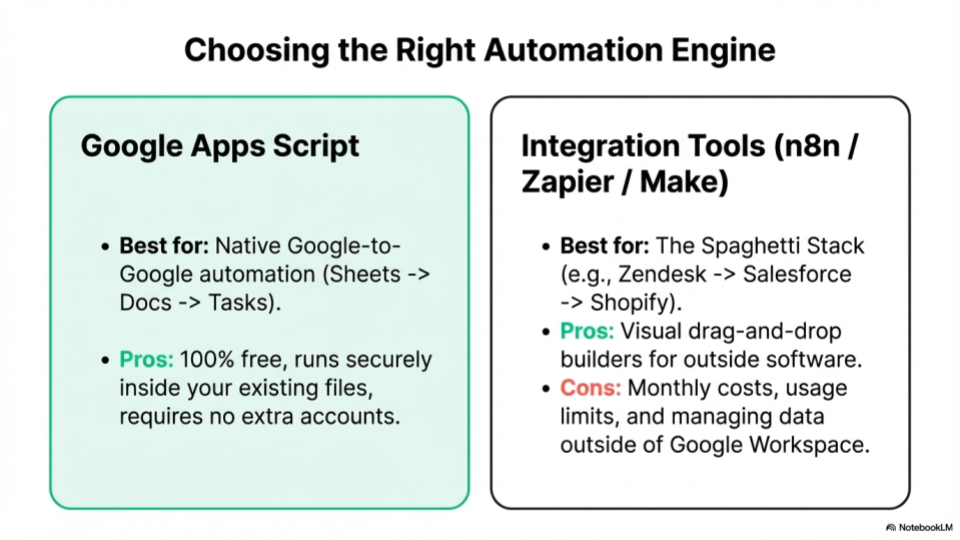
The primary operational utility of AI does not reside in basic content generation, but rather in data manipulation, process automation, and workflow standardization. For affiliate managers seeking an easy entry point into automation without investing in complex enterprise systems, the most accessible solution now exists within standard spreadsheets found in Google Sheets.
Google Apps Script is a scripting platform developed by Google that allows you to extend the functionality of Google Sheets and automate repetitive tasks. Think of it as a powerful, hidden engine running behind your spreadsheets. Instead of being limited to standard cell-based calculations, Apps Script allows you to write custom instructions that can manipulate data, talk to external systems, and execute complex workflows in the background.
Apps Script is natively integrated directly inside Google Sheets, meaning it requires no extra software installation or server setup to run. Here’s how it functions within your spreadsheet ecosystem:
- The Code Editor lives inside your sheet: You can access it instantly by navigating to Extensions > Apps Script from the top menu of any Google Sheet. This opens a built-in development environment tied directly to that specific file.
- It operates on “Triggers” and events: You can set scripts to run automatically based on specific actions, such as when a user opens the spreadsheet, edits a cell, or on a timed schedule (e.g., every Monday at 9:00 AM).
- It delivers clean, static outputs: Unlike traditional formulas that constantly recalculate every time a cell changes, an Apps Script can process data and output hardcoded, static text values. This keeps your spreadsheets incredibly fast, lightweight, and easy to filter, even when dealing with thousands of rows of partner data.
From a practical standpoint, Apps Scripts are replacing traditional spreadsheet formulas. While functions like VLOOKUP have long been the standard for managing partner data, leveraging AI to write custom automation scripts provides a more scalable, flexible, and accurate method for processing complex data sets.
Good Vibes Only: Moving Beyond Basic Text Generation
There is a measurable performance gap between free AI models and paid enterprise or professional tiers. Free versions routinely struggle with multi-layered, analytical tasks. Conversely, advanced models, such as Claude’s “skills” structure or custom memory rules, allow users to establish structured frameworks, business context, and brand rules that the AI can follow systematically.
Furthermore, AI-generated scripting addresses a chronic resource constraint in marketing organizations: developer bandwidth. Internal data tools and bespoke marketing reports are rarely prioritized by engineering teams.
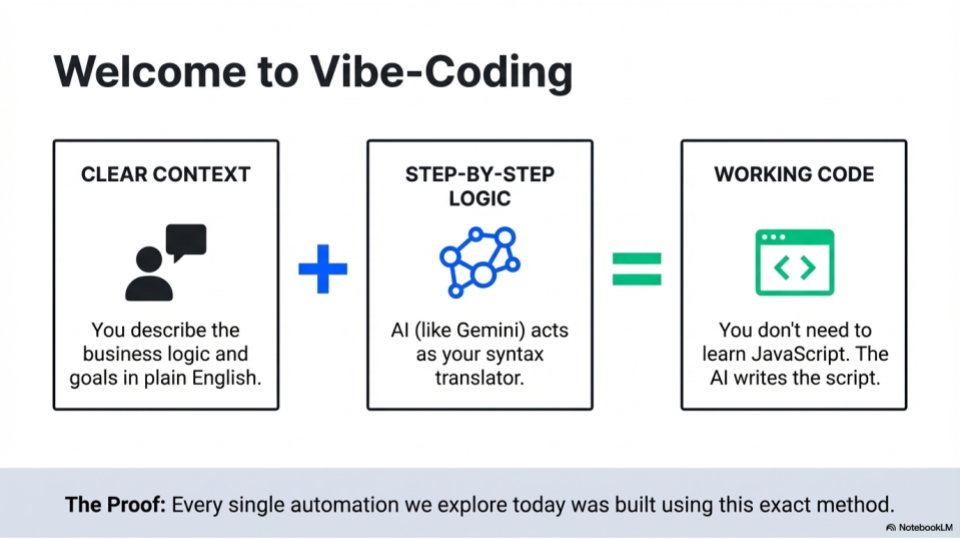
By utilizing AI to write operational Apps Scripts, affiliate managers who understand their specific workflow pain points can develop functional backend solutions independently, without requiring a formal coding background. This friction-free interaction is driven by a shift toward “vibe-coding” – where you no longer need to write a single line of syntax yourself. Instead, your primary job is simply to describe the business logic and clear instructions in plain English, while the AI translates that “vibe” into flawless execution code.
What is “Vibe-Coding?”
Vibe-coding refers to a modern development style where a human describes a desired software outcome using everyday natural language (the “vibe”), and an advanced AI system takes care of writing, structuring, and fixing the actual code. For affiliate managers, it means your value is no longer tied to knowing complex programming syntax; your value comes from knowing your data structure and accurately directing the AI on what problem to solve. Learn more about vibe-coding and automation.
➡️ Real World Example: Upgrading to Apps Scripts
The Use Case: Moving a legacy team workflow from an unstable complicated master spreadsheet crammed with nested VLOOKUP and IF formulas to a script-driven architecture.
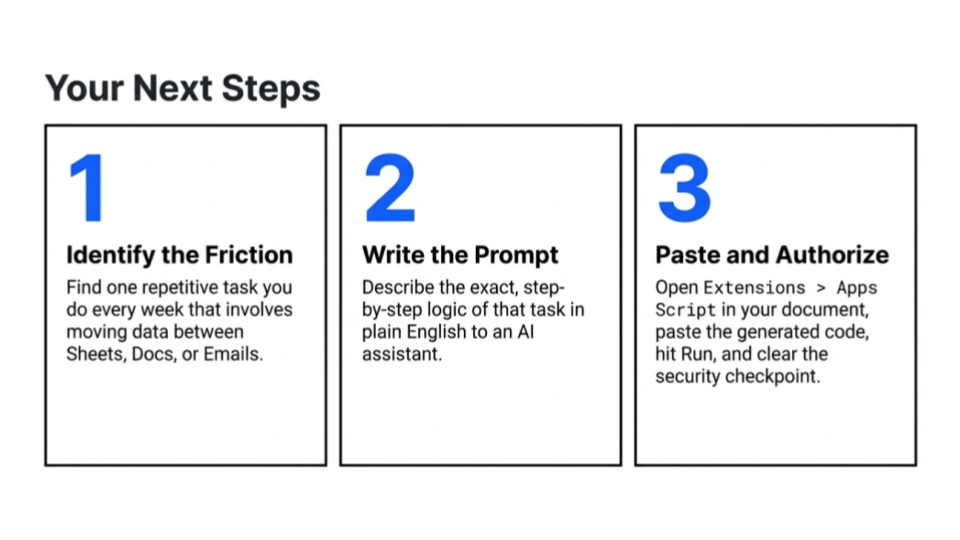
How To Do This: Instead of debugging broken formula strings across thousands of rows, open Google Sheets, go to Extensions > Apps Script, and ask your AI assistant to build an automation.
The Setup Prompt: “I have a spreadsheet with a master partner list. I need a Google Apps Script that automatically populates the real-time status of each affiliate based on their lifetime revenue. Do not use formulas; the script must output hardcoded, static text values (e.g., ‘Tier 1’, ‘Tier 2’) so the sheet remains fast and easy to filter.”
Strategic Steps for Getting Started
Before deploying AI-guided scripting into daily operations, agency leaders and managers can benefit from establishing a foundational testing environment to mitigate early friction. A common operational roadblock occurs when a team attempts to build complex, multi-platform automated systems before mastering basic AI data interactions. To create a smoother transition, the PMA AI Council recommends an approachable, three-step onboarding framework:
- Use A Paid AI Subscription: Standardize team workflows on paid, advanced AI models rather than free public LLMs. Professional tiers feature advanced reasoning engines capable of managing multi-layered code parameters, whereas free alternatives routinely fail at processing technical logic and spreadsheet structures.
- Isolate a Single Localized Pain Point: Identify a highly specific, repetitive task currently handled manually within a spreadsheet, such as sorting publishers alphabetically by country or categorizing partners by monthly revenue tiers. Don’t attempt to link external systems, databases, or CRMs during your initial implementation.
- Execute a Single-Tab Pilot: Restrict your initial automation script to a single spreadsheet tab containing sanitized, test data. This isolated environment allows the user to familiarize themselves with the iterative nature of development, moving through a predictable cycle of script execution, error logging, prompt refinement, and successful resolution, before scaling to business-critical systems.
➡️ Real World Example: Your First Onboarding Project
- The Use Case: Initiating your first automated workflow by instructing the AI to perform a basic data categorization task on a single, isolated dataset.
- How To Do This: Open a blank Google Sheet, paste a raw sample export of 50 affiliate profiles, navigate to Extensions > Apps Script, and open your paid AI interface.
- The Foundation Prompt: “I am testing my first Google Apps Script and need to establish a basic validation loop. Look at this single sheet layout. Write a script that parses column C (Country). If the value is ‘US’ or ‘CA’, input ‘Domestic’ into column D. If the value is anything else, input ‘International’. Ensure the code includes basic execution logs so I can verify its structural path.”
High-Impact Workflows: Data Aggregation and Practical Application
Affiliate managers frequently handle fragmented data exported from multiple platforms. A foundational project involves importing separate data streams into individual spreadsheet tabs and using AI to consolidate them into a singular, actionable interface.
Workflow 1: Multi-Tab Data Consolidation
Consider a scenario where an affiliate manager exports three distinct reports into a single Google Sheet: three months of raw performance data from an affiliate network (Tab 1), partner contact information and notes from a CRM system (Tab 2), and ongoing lifetime value (LTV) data from Google Analytics (Tab 3).
- The AI Mechanism: Because Google Gemini has native access to Google Workspace, an affiliate manager can provide the spreadsheet structure directly to the AI chat to generate the required automation.
- The Instruction: “Generate an Apps Script that references the common Affiliate ID across these three tabs, aggregates the corresponding data points, filters for affiliates generating over $1,000 in monthly revenue, and outputs the consolidated data into a new tab.”
- The Result: The script compiles the messy variables into clean, static numbers on a single tab, allowing the manager to instantly sort and prioritize partner engagement.
Workflow 2: Automated Outbox Streams
Once data is consolidated, the automation workflow can be extended to streamline communication logistics.
- The AI can generate an Apps Script designed to review the consolidated performance metrics, specific affiliate details, and monthly payouts to write customized messages for each partner.
- A secondary script can programmatically push these tailored data points and text structures directly into the manager’s email client as drafts.
- This removes the manual overhead of copying and pasting individual metrics while mitigating the risk of human error, such as accidentally sending a partner an incorrect payout figure.
➡️ Real World Example: Stitching Together Disparate Reports
The Use Case: Consolidating network performance logs, CRM manager assignments, and analytics traffic data into a single master dashboard, then generating customized draft outreach.
How To Do This: Open a Google Sheet and paste your raw data into three separate tabs named NetworkData, CRMContacts, and AnalyticsLTV. Ensure each tab contains an Affiliate ID column to link them.
The Execution Prompt: “Look at this layout of a Google Sheet with tabs ‘NetworkData’, ‘CRMContacts’, and ‘AnalyticsLTV’. Write a Google Apps Script that maps all matching profiles using ‘Affiliate ID’. Filter for partners who generated over $1,000 this month. Write a secondary script that loops through this new filtered list, drafts a customized email mentioning their exact payout amount from column D, and pushes it directly into my Gmail account as a Draft. Do not send the emails automatically.”
Risk Mitigation: Best Practices for Script Development
Developing tools with AI requires specific operational guidelines to ensure accuracy and prevent technical errors. The PMA AI Council recommends three baseline protocols:
Mandate Code Logging: When instructing an AI to write an Apps Script, always include the directive to embed logging protocols within the code. Code errors are standard during development. When a script breaks, the error log can be copied and pasted back into the AI interface, enabling the model to diagnose and fix the issue accurately.
Practice Data Privacy Protocols: Prior to pasting any spreadsheet layouts, sample rows, or data logs into an AI interface, it’s advisable to sanitize datasets. Avoid pasting raw partner Personally Identifiable Information (PII), sensitive payout structures, or proprietary CRM data into AI tools. Instead, utilize anonymized placeholders (e.g., “Partner 1”, “Country X”) and randomized financial metrics to map out the spreadsheet structure for the AI without exposing sensitive company or partner data.
Utilize Pre-Generation Queries: Prior to executing a script generation prompt, conclude the instruction with: “Ask me any clarifying questions you require to ensure this script is built accurately on the first attempt.” This forces the AI to identify logical gaps or missing parameters before writing code.
Handle Imperfect Data Structuring: AI is highly proficient at normalizing inconsistent labeling across data exports. If manual data entry has created variations (e.g., “Instagram Creator”, “Influencer IG”, and “Social”), the manager can instruct the AI: “Treat these three variations as an identical category when aggregating performance totals,” eliminating the need for manual sheet cleanup.
➡️ Real World Example: The Debugging Workflow
The Use Case: Overcoming a script execution error or dealing with inconsistent naming conventions across your network networks without manually renaming hundreds of rows.
How To Do This: When creating or troubleshooting your automated tracking scripts, use explicit system guidelines inside the AI interface.
The Prompt Strategy: Before letting the AI generate code, append defensive structural and privacy instructions to your prompt: “Please ensure the script includes robust code logging so I can trace exactly where an execution breaks. Note that all partner names and payout figures in this sample have been completely anonymized for data privacy. Under the ‘Category’ column, treat any instances of ‘Instagram Creator’, ‘Influencer IG’, or ‘Social’ as the exact same bucket. Before writing the code, ask me any clarifying questions you need to ensure this works on the first attempt.”

Maintaining Strategic Oversight: The “Human in the Loop” Approach
Because the foundation of affiliate marketing relies on relationship management, executing total automation across external communications, compliance monitoring, and partner vetting introduces operational risks. Relying blindly on automated scripts to manage critical partner decisions can backfire; minor data anomalies, system mismatches, or misinterpreted scripts can inadvertently distribute incorrect financial reporting data, generate false compliance or fraud flags, or trigger unwarranted account closures.
These technical errors can disrupt hard-earned partner trust, fracture long-standing relationships, and create brand alignment issues. Furthermore, if an AI is tasked with executing evaluations it lacks the systemic data to solve, such as judging qualitative content nuances or assessing complex fraud vectors in isolation, the system risks hallucinating findings or applying false positives across healthy accounts.
Collaborative Principle: AI is most effectively deployed not to autonomously run external operations or replace professional judgment, but to eliminate repetitive backend administration. This framework intentionally preserves a “human in the loop,” allowing affiliate managers to utilize automated systems for real-time visibility while redirecting their human capital toward strategic partner cultivation and nuanced decision-making.
To safeguard brand identity and maintain authentic partnerships, AI is best utilized to optimize internal workflows, data aggregation, and background alerting systems rather than executing automated decisions directly against external partners without oversight.
The Internal Alert Framework: Instead of allowing a script to automatically email a partner when an issue arises, a background script can be configured to monitor month-over-month spreadsheet data. If an active publisher experiences a significant drop in revenue or traffic, the system triggers an internal notification directly to the affiliate manager.
Personalized Resolution: This internal alert serves as a timely prompt for the manager to review the data contextually and initiate direct, personalized outreach. Whether checking in to see if the partner needs updated creative assets, troubleshooting a tracking error, or offering a custom promo code, the human manager remains the primary relationship touchpoint.
➡️ Real World Example: The Traffic Leak Alert System
The Use Case: Identifying a sudden drop in a top partner’s performance so a manager can provide immediate, white-glove assistance before revenue drops further.
How To Do This: Build an automated internal triage script that cross-references week-over-week or month-over-month spreadsheet logs, looking for sharp downward anomalies.
The Action Prompt: “Write an Apps Script that checks the ‘Current Month Revenue’ column against the ‘Prior Month Revenue’ column. If any partner with an historical volume over $5,000 experiences a drop of 50% or more, automatically send an internal notification email to me (manager@company.com) with the affiliate’s ID, their assigned manager’s name, and the specific metrics of the drop.”
The Human Element: The manager receives the email, reviews the publisher’s site, and texts the partner directly: “Hey Sarah, noticed a traffic dip on our tracking dashboard this week. Just wanted to check in. Do you need updated creative assets or a custom promo code to help optimize the placement?”
Organizational Training and Leadership Blueprints
For agency founders and brand stakeholders, integrating AI into existing workflows requires a structured team strategy:
Deploy to Early Adopters: Rather than executing a mandatory, top-down software rollout, identify team members who show natural technical aptitude. Task them with automating highly repetitive internal tasks first, such as gathering the recurring data metrics required for weekly client briefs. Once validated, these automated sheets can be distributed to the broader team.
Update the Onboarding Standard: Standard training frameworks for incoming staff should phase out advanced, convoluted formula structures (such as deeply nested IF statements or complex VLOOKUPs) in favor of AI-guided Apps Scripting. Scripting delivers static data values rather than calculation formulas, making the underlying spreadsheets more stable, easier to filter, and highly scalable as new data points are added.
➡️ Real World Example: Democratizing AI Innovation
The Use Case: Up-skilling an entire affiliate agency team without forcing them through expensive, time-consuming coding bootcamps.
How To Do This: Identify one or two affiliate managers who express open interest in technology and give them a structured micro-project to optimize the agency’s most time-consuming task.
The Execution Blueprint: Task the early adopters with building a standardized “Client Brief Master Sheet”. Instruct them to use paid AI chats to write Apps Scripts that aggregate weekly performance data for regular client reviews, a task that historically takes hours to pull manually. Once the script functions perfectly, save it as a custom macro button inside the agency’s shared Google Sheet template, allowing every other employee to generate the same report in seconds with a single click.
Reporting Affiliate Value to Executive Leadership
As teams master backend data consolidation, the next phase of AI utility involves translating affiliate metrics into broader corporate data that aligns with C-suite objectives. Senior marketing executives often undervalue the affiliate channel because it is frequently reported solely through isolated, flat revenue metrics. By utilizing AI to stitch together cross-departmental data streams, affiliate managers can provide an automated reporting structure that demonstrates broader enterprise value.
By replacing traditional formulas with AI-assisted Apps Scripts, affiliate departments can eliminate routine manual reporting, improve data accuracy, and focus operational resources on relationship cultivation and strategic channel growth.
➡️ Real World Example: The C-Suite Dashboard Translation
The Use Case: Pulling brand discovery metrics (AI Engine Optimization/AEO data) and cross-referencing them with partner IDs to justify higher affiliate budgets to the Chief Marketing Officer.
How To Do This: Import your standard affiliate revenue data into Tab 1, and your digital PR or brand citation logs (tracking where your brand is mentioned in LLM search engine results) into Tab 2.
The Translation Prompt: “Write a Google Apps Script that pairs our top content publishers with our digital mention logs. If an affiliate partner’s content matches a domain cited inside modern AI search engines, extract that row and place it into a ‘C-Suite Summary’ tab. Calculate the total brand impressions alongside the revenue, and format it into a clean data table tailored for executive presentation.”
Systemizing the Transition
Transitioning from traditional spreadsheet formulas to AI-guided Apps Scripting represents a measurable operational upgrade for affiliate departments. By treating code generation as a standard tool for daily administrative tasks, affiliate managers can standardize fragmented data, eliminate manual data-entry errors, and build predictable internal reporting systems.
Ultimately, leveraging AI to automate backend workflows does not replace the human element of affiliate management. Instead, it optimizes resource allocation, allowing affiliate managers to redirect their time away from the data-entry trenches and toward strategic channel growth, performance narrative translation, and high-touch partner cultivation.
By deploying this framework systematically, agency and brand leaders can transform the affiliate department from an isolated revenue engine into an optimized, future-proofed center of digital brand intelligence.